
Screenshots
App details
- Updated
- 2022-10-31T06:08:00.8496468Z
- Requires
- Windows 10 version 10240.0 or higher
- Language
- English
- Developer
- Windows Portable Apps
- Category
- Mobile
SoftPas in:
This product is also available in the following languages:
About AlwaysOnTop Switch (Window Tool)
Download AlwaysOnTop Switch (Window Tool) – Window Management, Productivity, Multitasking
Overview
AlwaysOnTop Switch (Window Tool) is a focused utility designed to enhance multitasking efficiency on Windows-based systems. The app enables users to keep any open window on top of other applications, a functionality particularly useful during presentations, screen sharing, or when referencing information across multiple programs. By maintaining visibility of critical windows—such as chat tools, reference documents, or media players—users can improve concentration and reduce context switching. This tool is ideal for professionals, students, and remote workers who rely on seamless window management to maintain workflow continuity.
The app serves as a lightweight solution for a common yet persistent challenge: keeping essential windows visible without constant manual rearrangement. It targets users who frequently switch between tasks and need quick access to specific application windows. While the developer’s background is not detailed in the provided information, the app’s straightforward design and clear troubleshooting guidance suggest a focus on user accessibility and reliability. Real-world use cases include monitoring a live feed during a video call, referencing a document while writing, or keeping a calculator visible during data entry.
Within the broader ecosystem of productivity tools, AlwaysOnTop Switch fills a niche by offering a dedicated, no-frills solution for window stacking. Unlike full-featured window managers, it avoids complexity, prioritizing speed and simplicity. Its presence underscores the ongoing demand for lightweight utilities that deliver immediate value without system overhead.
Key Features & Functionality
- Easy Window Management: Users can designate any open window to remain on top with minimal effort. This feature is especially beneficial during presentations or when comparing content across multiple applications, ensuring critical information stays visible at all times.
- User-Friendly Interface: The app features a clean, minimal design that prioritizes clarity and ease of access. Even users with limited technical experience can navigate the tool without confusion, reducing the learning curve and enabling immediate productivity.
- Toggle Functionality: A single toggle switch allows users to activate or deactivate the AlwaysOnTop state instantly. This responsiveness supports dynamic workflows where window priorities shift frequently, enabling seamless transitions without interrupting ongoing tasks.
- Error Resolution Guidance: The app provides clear instructions for resolving common launch issues, such as the 'MSVCR100.dll' error. Users are directed to install the x86 version of Microsoft Visual C++ 2010 Service Pack 1, a proactive step that enhances setup reliability and user satisfaction.
- Versatile Compatibility: Designed to work with a wide range of Windows applications, the tool integrates smoothly into diverse workflows. Its broad compatibility ensures consistent performance across different software environments, from office suites to creative tools.
For example, a student writing a research paper can keep a reference document always visible while typing, reducing the need to switch windows. Similarly, a customer support agent can maintain a live chat window on top while navigating a CRM system, improving response times and service quality.
Interface, UX & Performance
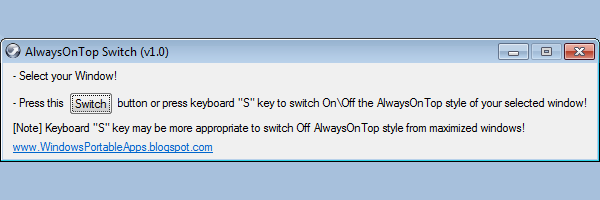
The interface of AlwaysOnTop Switch is intentionally minimal, emphasizing functionality over visual flair. It features a compact window with a single toggle button and basic status indicators, allowing users to focus on the core action: setting a window to always-on-top. The visual layout is consistent and predictable, minimizing cognitive load and supporting intuitive navigation.
Navigation is streamlined—users simply select the target window, then toggle the feature. No complex menus or settings are required, which enhances usability for both novice and experienced users. The responsiveness of the toggle function is fast, with minimal delay between activation and visual feedback, ensuring a smooth user experience.
Although the developer did not list formal performance metrics, the app’s lightweight nature suggests low CPU and memory usage. It is designed to run in the background without interfering with other processes. Stability appears to be a priority, as the inclusion of error resolution guidance indicates an effort to prevent common installation failures. The app does not appear to require significant system resources, making it suitable for use on older or lower-end systems.
Platform Compatibility & Technical Requirements
AlwaysOnTop Switch (Window Tool) is designed for Windows operating systems. The specific platform version and minimum OS requirements were not listed by the developer. Similarly, no details were provided about file size or system specifications beyond the general context of a lightweight utility.
Compatibility information was not fully disclosed, so users should ensure their system meets the standard requirements for running Windows applications. The app’s reliance on the MSVCR100.dll file suggests it was built using Microsoft Visual C++ 2010, which may require additional runtime components on some systems.
Pros and Cons
Pros
- Simple, intuitive interface ideal for users of all experience levels.
- Fast and responsive toggle functionality for real-time window management.
- Clear troubleshooting guidance for common installation errors.
- Lightweight design with minimal system impact.
- Effective for multitasking scenarios across various professional and personal workflows.
Cons
- Specific system requirements and file size were not disclosed.
- No information on update frequency or developer support channels.
- Functionality is limited to window stacking—no additional window management features.
- Compatibility with newer Windows versions was not confirmed.
- Only available for Windows; no mobile or cross-platform support was indicated.
FAQ
Is AlwaysOnTop Switch safe to download and install?
Yes, the app is designed as a lightweight utility with no known malware. However, users should download it from trusted sources to ensure security. The inclusion of error resolution steps suggests a focus on reliability and user safety.
Can I use AlwaysOnTop Switch on older versions of Windows?
While the app is compatible with standard Windows environments, specific compatibility with older Windows versions was not confirmed. Users should ensure their system supports the required Microsoft Visual C++ runtime components.
Do I need to install additional software to run the app?
Yes, users may need to install the x86 version of Microsoft Visual C++ 2010 Service Pack 1 if they encounter the 'MSVCR100.dll' error during launch. This is a standard runtime dependency for some legacy applications.
Is AlwaysOnTop Switch available for Android or iOS?
Based on the available information, the app is designed exclusively for Windows. There is no indication of availability on mobile platforms such as Android or iOS.
How often does the app receive updates?
The developer did not provide information on update frequency. Users should check the official source periodically for new versions or patches.
Final Thoughts
AlwaysOnTop Switch (Window Tool) delivers a focused, reliable solution for users seeking to improve multitasking efficiency on Windows. Its minimalist design, instant toggle functionality, and clear error resolution make it a valuable addition to any productivity toolkit. While it lacks advanced features or cross-platform availability, its simplicity and effectiveness stand out in a crowded market of utility tools.
Professionals, students, and remote workers who frequently manage multiple windows will find the app particularly beneficial. It enhances workflow continuity by ensuring critical information remains visible without manual intervention. The app’s lightweight nature and low system impact further add to its appeal, especially on older or resource-constrained devices.
For those in need of a no-nonsense window management tool, AlwaysOnTop Switch offers a secure, straightforward, and efficient way to stay organized. Download AlwaysOnTop Switch now
Guides & Tutorials
How to install AlwaysOnTop Switch (Window Tool)
- Click the Download button above.
- Once redirected, accept the terms and click Install.
- Wait for the AlwaysOnTop Switch (Window Tool) download to finish on your device.
How to use AlwaysOnTop Switch (Window Tool)
This software is primarily used for its core features described above. Open the app after installation to explore its capabilities.
User Reviews
No reviews yet. Be the first to share your experience.
You may also like
more
Que no te pillen¡
About !Que no te pillen¡Reviewed by Jason A. BilbreyShow MoreShow Less

3D Combat Zone
About 3D Combat ZoneOriginally released in 1983, 3D Combat Zone immerses players...

666: El día del portal
About 666: El día del portalOn June 6, 2006, Agent P. Stone uncovers a sinister...

80 in 1 Best Flash games
About 80 in 1 Best Flash games 80 in 1 Best Flash games is a collection of 80 fl...

ABYSS SEEKERーーWhat Do You See Deep in The Abyss
About ABYSS SEEKERーーWhat Do You See Deep in The AbyssIn ABYSS SEEKER, players...

ACA NEOGEO THE KING OF FIGHTERS 2002 for Windows
About ACA NEOGEO THE KING OF FIGHTERS 2002 for WindowsTHE KING OF FIGHTERS 2002,...